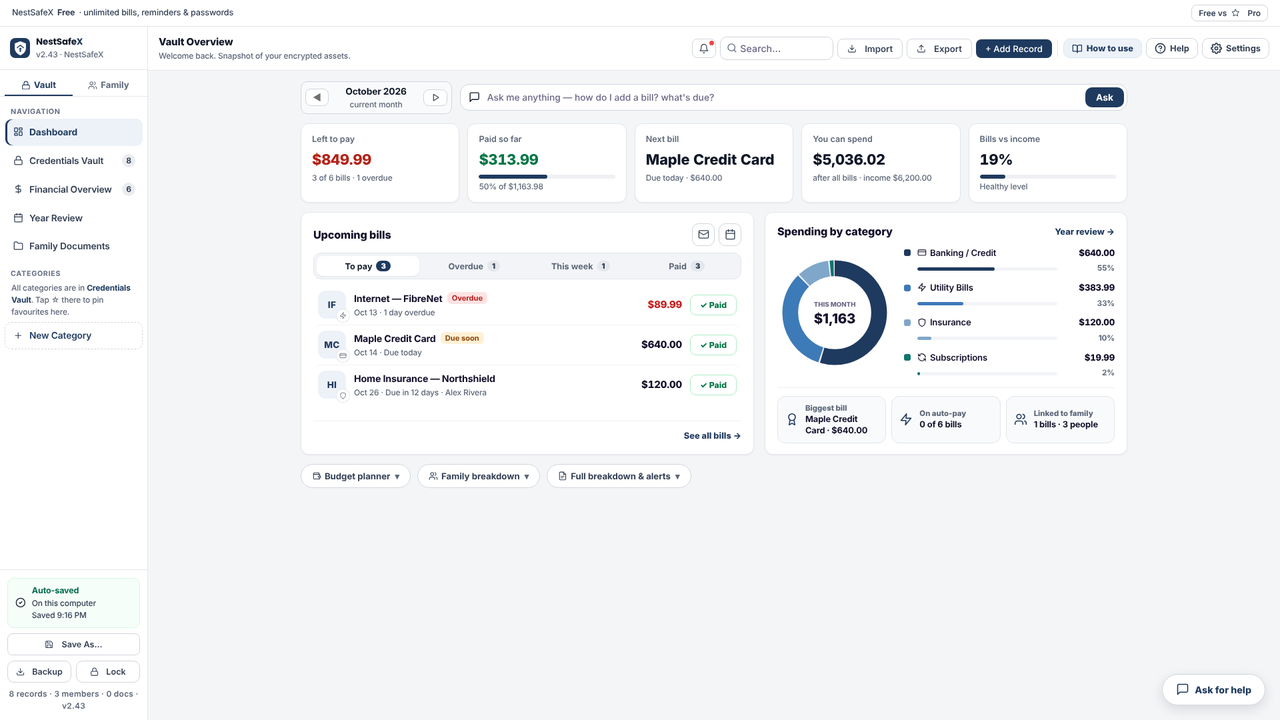
The mortgage, the insurance policy, the utility accounts, the passwords, the kids' school records — NestSafeX keeps every piece of it in one encrypted file that lives on your computer. Not on our servers — we never see it. Yours.
Download for Windows, Mac and Linux · On phones, tap Install and it works like any other app · No account, no sign-up
Not a password manager wearing a budgeting hat. Built specifically for the things a household actually has to keep track of — and the things a family would desperately need if you weren't there to explain them.
Every bill, subscription and card payment in one running total, with an assistant that tells you what to pay today.
Keep foreign bills and income in their own currency and still get a single number you can act on.
Bulk-import everything from a spreadsheet instead of typing records one at a time.
The logins and reference numbers nobody can guess and everybody eventually needs.
Tax slips, vaccination records, the lease, the will — filed and tagged to the person they belong to.
Give each person a 4-digit PIN and their own view. They see their records — never your banking logins.
No installer, no app store, no account. Download a single HTML file and open it in your browser — you're in immediately, with a password step that's entirely optional. Everything you save is encrypted into a file you keep — on your desktop, your USB stick, your own Dropbox. If BlueJeera disappeared tomorrow, your vault would still open.
Free to use — no card, no account. Upgrade to Pro anytime ($4.88 once). Your data stays yours.
NestSafeX installs straight from your browser — no app store, no account. It gets its own icon, opens full screen, works with no signal, and keeps everything encrypted on your device. Free on Android, iPhone, Mac, Windows and Linux. On Android you can also get the Google Play app.
📲 Install NestSafeX — freeAlready installed? Just open it from your home screen or Dock.
No sign-up, no account, no tracking. It works with no internet. Your family's information stays on your device — all yours.
| Typical finance & vault apps | NestSafeX | |
|---|---|---|
| Sign-up / account needed | Yes — email, password, often phone | No |
| Your data stored on their servers | Yes | Never — only on your device |
| Works with no internet | Usually not | Yes, fully offline |
| Ads, tracking or analytics | Often | None |
| Monthly subscription | Often $5–$10 a month | Free · Pro $4.88 once |
| If the company shuts down | Your data may go with it | Keeps working — it's your file |
Pay once — no subscription, ever. We don't run servers, so we don't need to bill you every year.
Windows, Mac, Linux, and the web app on any phone
Key by email in seconds · card or PayPal · 30-day money-back guarantee
Android: NestSafeX Pro is a separate app on Google Play (coming soon)
| Free | ⭐ Pro | |
|---|---|---|
| Works with no internet | ✓ | ✓ |
| No sign-up, no account, no data collected | ✓ | ✓ |
| No ads, no tracking | ✓ | ✓ |
| Bills & payments | Unlimited | Unlimited |
| Bills carry forward every month | ✓ | ✓ |
| Paid, partly paid, overdue at a glance | ✓ | ✓ |
| Dashboard & family budget | ✓ | ✓ |
| Who paid what | ✓ | ✓ |
| Bill reminders & payment summary | ✓ | ✓ |
| Credentials Vault (passwords, accounts) | Unlimited | Unlimited |
| Encrypted backup & restore | ✓ | ✓ |
| Offline helper | ✓ | ✓ |
| Free family finance training | ✓ | ✓ |
| Family members | 2 | Unlimited |
| Devices | 1 | Up to 6 |
| Year Review | — | ✓ |
| Family Documents | — | ✓ |
| Import bills from Excel or CSV | ✓ | ✓ |
| Export to Excel | — | ✓ |
| Bills in other currencies | — | ✓ |
| Price | $0 | $4.88 once |
No. NestSafeX never uploads your vault. Everything is encrypted with AES-256-GCM and stays on your own device, or in a file you choose to put somewhere — your USB drive, your own Dropbox. BlueJeera never sees it, never stores it, and has no copy; there is no account to breach and no server to hack. The only other copy is one your phone may make itself: Android's own Google backup can keep an encrypted copy of the app's data in your Google account.
No — it's entirely up to you. Skip it and your vault is still encrypted with AES-256, just using a key NestSafeX generates and keeps on your device instead of a phrase you type. Prefer a password too? Add one at setup or anytime later in Settings. Just know that if you do set one and forget it, there is no reset — the same model as 1Password. Choose a memorable phrase and write it somewhere safe.
Yes. On Android, get NestSafeX (free) or NestSafeX Pro on Google Play (coming soon). On any phone, including iPhone, you can also use the web app: open bluejeera.com/nestsafex/app/ and add it to your home screen. A Pro key bought here works on computers and the web app; on Android, Pro is a separate Google Play app. Move your vault between devices with a backup.
One vault file covers your whole household. Each family member gets a profile and an optional 4-digit PIN that shows them only their own records — never your banking logins. To use it on another device, copy the vault file there, or keep it in shared storage you already trust.
Yes. NestSafeX exports all your bills as calendar reminders that alert you 3 days before and on the due date. Import them once into Google, Apple or Outlook Calendar and switch on email notifications — you'll be reminded even when the app is closed. The app also flags overdue bills and can write you a summary email in one click.
Yes. Set your home currency, then tag individual bills or income in another currency with an exchange rate you control. A ₹4,500 bill shows as ₹4,500 on its card and converts into your home-currency total automatically. 45 currencies are supported, with proper codes so USD, CAD, AUD and SGD are never confused.
No. Download the spreadsheet template, fill it in Excel, and import the whole thing at once. Later you can export everything back out, update amounts in Excel monthly, and re-import — matching records update in place instead of duplicating.
Free has bills, the dashboard and family budget, the Credentials Vault, Excel/CSV import, encrypted backup and the helper — on one device, with up to 2 family members. Pro ($4.88 once) adds Year Review, Family Documents, unlimited family members, Excel export and other currencies, on up to 6 devices. No subscription, no ads. BlueJeera also runs free family finance training; we never see your vault, so there is nothing of yours to sell.
Only if you want tips and updates. The app never asks for it, and your vault never leaves your device. If you sign up, you choose separately whether to hear about offers, and every email has an unsubscribe link.
Your vault keeps working. The file on your computer contains the entire application and your encrypted data — no server calls, no license server, no expiry. That's not a promise, it's how the software is built.
Free to start. Pro is $4.88 once. No subscription, no account.
Free online sessions for families in Canada and the United States. Bring your questions; leave with a plan. No cost and no obligation.
Interested? Just call or email BlueJeera — there is no form to fill in. Contacting us is separate from the app — your vault is never shared. Sessions are educational; if you ever want help with a financial or insurance product, we will tell you clearly, and you can always say no.
Optional, and separate from the app. Your vault is never shared — it never leaves your device. Unsubscribe anytime.
✉️ Sign up for tips & updatesNestSafeX is built and supported by BlueJeera in Milton, Ontario, Canada. We make simple, private tools that help families stay organised.
We designed NestSafeX so your information never reaches us: there is no account and no server holding your data. It stays on your own device, encrypted.
Have a question before you try it? Call or email us.